
Write to us
Contact form
Go to the contact formEnterprise AI
One secure AI workspace: multi-model chat, company knowledge, meeting minutes and no-code agents.

Product
JAPAN AI
One secure AI workspace for the whole company. Chat with leading AI models, search your own documents, turn meetings into minutes, and let anyone build AI agents without coding. Built by JAPAN AI, a GENIEE group company trusted by 10,000+ corporate clients.
Plus an admin console for users, usage and budget
Chat with GPT, Gemini, Claude, Qwen and more. Live web search, and analysis of Excel, CSV and reports.
Search and chat with manuals, contracts, emails, images and audio. Answers cite the source.
Records and transcribes meetings with speaker identification, then writes minutes and action items in 80+ languages.
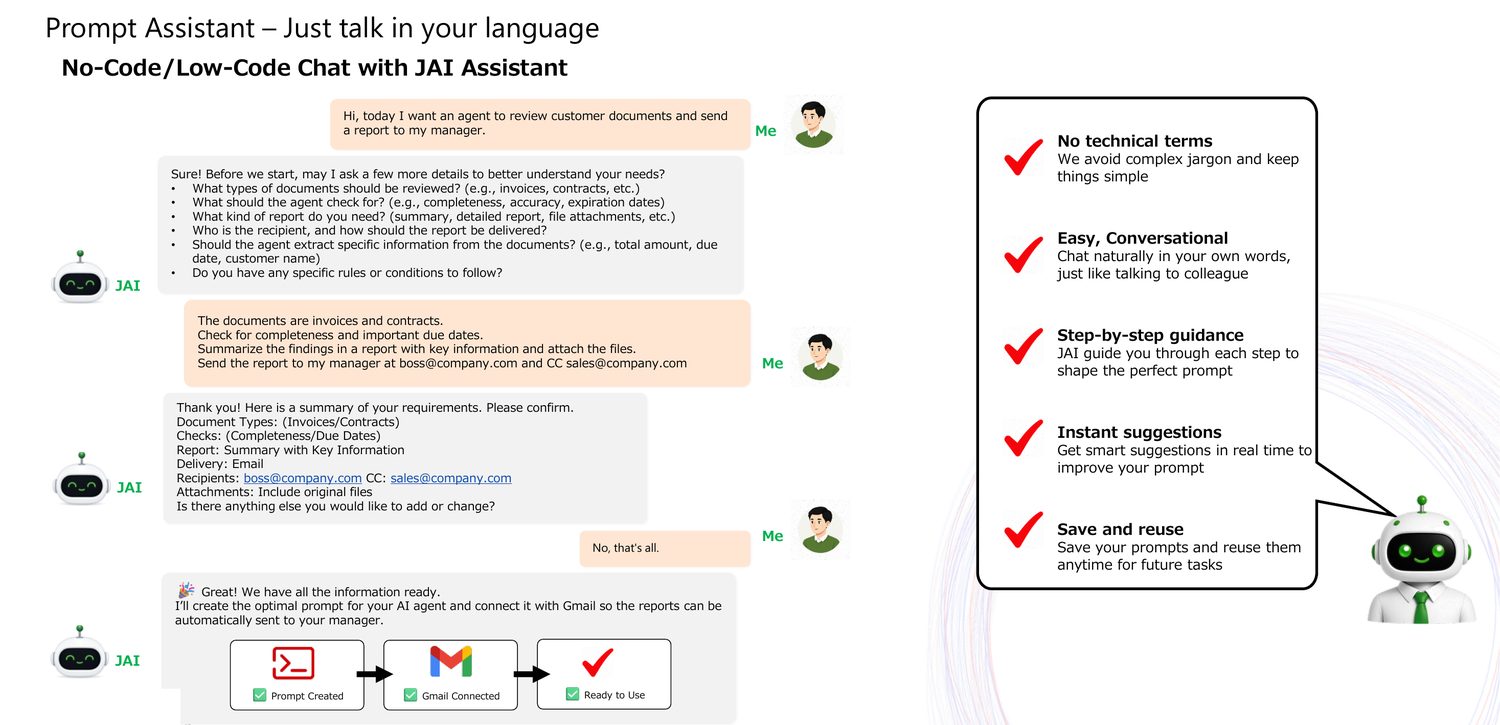
Anyone can build AI agents in plain language, no coding, and connect 20+ tools like Microsoft 365, Slack and Salesforce.
Pick a department. Examples built by employees on JAPAN AI; names and figures are illustrative.
Employees ask travel-expense questions in Thai or English. The agent answers only from the company regulation and cites the section.
BeforeSame questions to HR every trip
AfterInstant answer, rule cited
Scores every CV on one rubric, suggests interview questions and logs the results to Google Sheets automatically.
BeforeCVs read and typed by hand
AfterOne 70 + 10 point rubric for all
Reads receipts and claims with OCR, checks amounts and documents, groups expenses and fills the payment voucher form.
BeforeClaims checked one by one
AfterVoucher ready, risks highlighted
Searches company registrations and business news for Japanese companies newly set up in Thailand, with a source for every fact.
BeforeSearching many sites by hand
AfterOne table, every fact sourced
Checks your proposal against every RFP requirement with page references, scores it out of 100 and drafts the gap report email.
BeforePage-by-page comparison
AfterScore out of 100, every gap flagged
Turns short notes into a complete Thai, English or Japanese business email with the right politeness, saved as a Gmail draft.
BeforeWaiting for someone to review
AfterReady-to-send draft
Reads tax invoices with OCR, checks every line against the ERP report and returns only the mismatches.
Before1–2 days per cycle
After3 hours
Merges 11 source files into the monthly report template and flags cells that need a human check.
Before3 hours of data prep
After15 min
Reconciles the ledger to the aging report customer by customer, with supporting detail for every difference.
BeforeLine-by-line checks by hand
AfterDone in 10 min
Every morning, finds new vulnerabilities, rates them, matches the affected customers and drafts alerts for their sales owner.
BeforeAdvisories read by hand daily
AfterBriefing ready every morning
Reads specs from up to 20 files and screenshots at once and fills the standard parameter sheet.
BeforeTyped into Excel cell by cell
AfterOne standard sheet, 20 files per run
Compares price lists across vendors by part number, flags the lowest price and checks EOL, warranty and known issues.
BeforePrice lists compared line by line
AfterLowest price plus risk summary
Operators get the exact step from machine manuals and SOPs.
BeforeSearch through binders
AfterAnswer in seconds
Summarise logs and notes into a clear handover for the next shift.
BeforeNotes rewritten by hand every shift
AfterHandover summary drafted for review
Draft structured incident reports from photos and short notes.
BeforeReports written from scratch
AfterStructured draft from photos and notes
Turns the P&L file into a 16-topic PowerPoint with charts, insights and speaker notes, with every figure computed in code.
BeforeBuilt by hand every month
After16-topic deck, ready to edit
Transcribes Thai, English and Japanese meetings and turns them into minutes with topics and action items.
BeforeTaking notes, replaying recordings
AfterMinutes in 3 languages
Summarises raw data into charts such as fishbone, Gantt and histograms, exported as editable Excel or PowerPoint.
BeforeCharts redrawn on every change
AfterEditable charts from one prompt
Contact
Tell us about your site or team. We will suggest a starting point and show you a demo.
Contact form
Go to the contact form